会员登录
会员登录 会员注册
会员注册 AI工具
AI工具 在线教育
在线教育 全景云720
 全景视讯
全景视讯 在线留言
在线留言
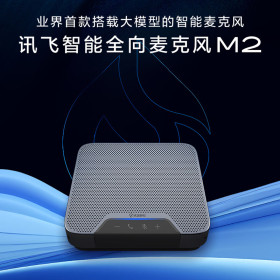
实时录音转文字,WEB、PC、小程序多端互通
一段录音,一键生成会议纪要,便捷高效
原文内容一键生成全文概览,快速掌握全文内容
语篇规整,口水稿变成书面稿,行文流畅可读性高
多语种转写+翻译覆盖,传播沟通无障碍

|
便携式SD卡录音机

收藏
推荐搭配爱讯
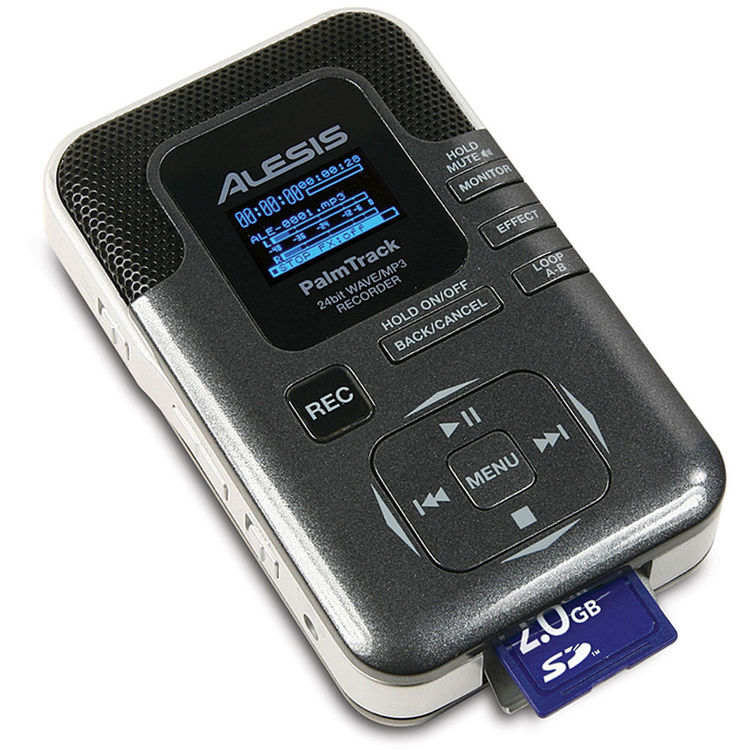
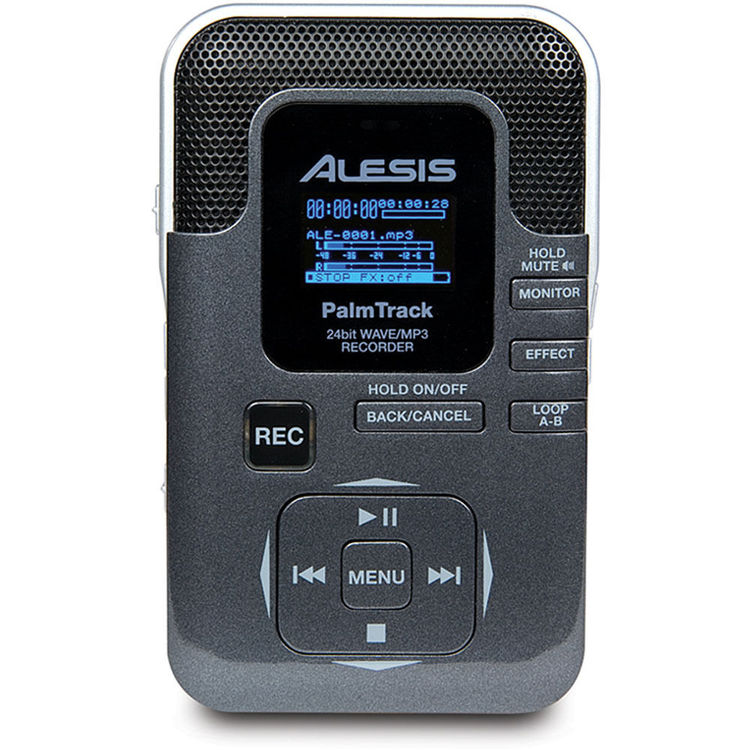
Alesis PalmTrack
特点: 手持SD录音机,具有立体声和四个微型话筒全景拾音模式 录制44.1/48kHz、64-320kbps MP3和16/24位WAV 四个板载话筒,具有高、低和自动增益功能,可实现无过载录音 低音补偿、合唱、音调转换、延迟、混响、MP3语音取消和调谐器 用于连接1/8(3.5mm)麦克风和线路电平音频的输入 立体声1/8(3.5mm)耳机输出和内置监听扬声器 包括SD卡,适用于几乎所有高达16GB的SD卡 用于连接Mac和PC的大容量存储的USB插孔 使用2节AA电池(随附)或交流适配器进行交流/直流操作 用于桌面和支架安装应用的螺纹安装点 Features:
Alesis PalmTrack
支持机器快转 智能录音转写更高效 AI语音识别技术,转文字准确率最高可达97.5% 1小时音频最快5分钟出稿 支持日、韩、粤、河南话等多种语言快速转写 智能区分说话人,快速整理稿件 实时在线编辑,音频与转写结果字音对应 转写结果一键导出word、txt、链接等多种形式 24-bit Portable Recorder The PalmTrack is an extremely affordable pocket‑sized recorder with plenty of features — but have Alesis sacrificed quality to keep costs down?
All the manufacturers who make pocket stereo recorders have their own take on the concept, some choosing to focus on features, others on quality, and a few on size. The PalmTrack isn't particularly small and isn't built to the most professional standards — but it must be the most affordable to offer 24‑bit recording, effects and multiple mic configurations. Indeed, in terms of features, it matches some products that cost twice as much. Overview & FeaturesThe Palm in the name is not a reference to the tropical plant, but its size in relation to the hand. Indeed, it is identical in length to my Nokia 6300 phone, although as it is 50 percent wider and at least twice as deep, most people won't be able to wrap their fingers around it to operate all the controls with a single grip. That said, it's still a good size for holding, and has a rounded casing that lets it slip into a pocket fairly easily. Hidden behind the black metal grille that surrounds the screen, the PalmTrack has four mic capsules configured as two pairs — so that selecting one pair gives a stereo spread, and all four an omnidirectional characteristic. To allow it to handle four capsule signals, the PalmTrack has four channels, which makes it possible to mix a stereo signal from either the line or external mic input with that of the on‑board mics. Also behind the grille is a speaker for checking recordings, plus a red LED that only shows itself when an input signal is overloading. Power is provided by two AA batteries or by using an optional power supply plugged into the left-hand side, where are also found the power on/off switch, a Low/High mic‑gain selector and an output volume control. The input/record volume control is on the opposite edge, nestled between the headphone out, external mic input and line input, all of which are represented by mini‑jack sockets. Recordings are captured on SD cards inserted in a slot on the edge closest to the operator, but if no card reader is available, audio can be transferred to a computer by plugging the supplied one‑metre USB lead into the socket alongside the jack inputs. Alesis have fitted the stand‑mount screw thread right beside the card slot, rather than underneath, where they are commonly found, and this makes it fiddly to remove and insert cards. Still, the battery‑compartment lid takes up most of the underside, so the designer may have had nowhere else to fit the thread! That said, mounting the recorder on a stand so that it sits upright makes a lot of sense if you're using the four mics to capture a 360‑degree panorama, and the plastic block supporting the thread enables the recorder to sit on its end without a stand. Buttons Up
The PalmTrack's rear panel includes a small monitor speaker for auditioning your recordings. Aside from the input and output volume controls just mentioned, all the remaining buttons are on the upper surface. The all‑important menu button sits at the centre of four others which, depending on the chosen mode, either navigate through menus and options or act as transport keys. Recording is initiated by a separate button, which flashes red in standby and stays lit when recording. In a column on the right are the buttons for setting start ('A') and end ('B') loop points for monitoring, and for controlling monitoring and toggling through effects. The last comprise Chorus, Pitch and Delay processors and Room and Hall reverbs, any of which can be inserted into the playback path (but not the record path) simply by repeatedly pressing the Effect button until the preferred one is selected. Effect parameter editing, however, is via a menu. The menu system is fairly simple, pared down to just five options: Record Setup, Play Setup, Effect, File and Utility. The last of these has a further five options, including a chromatic tuner, formatting and information relating to the SD card, and other useful system adjustments. Everything else is pretty much self‑explanatory. It's in the Record Setup menu, for example, that the file format is selected. MP3s can be created as 64, 96, 128, 160, 192, 224 or 320kbps files, at 44.1 or 48KHz, and there's the option to make 16- or 24‑bit WAV files. The screen's home page permanently features a stereo level‑meter, divided into 12dB intervals ranging from ‑48 to ‑12, then marked at ‑6 and 0. Above this, the display shows file name and type information, and then three timing indicators right at the top. The large digits increase in seconds as the track plays, the small ones count down to indicate how long it has left to play, and the bar-graph fills up to graphically represent both of the above at the same time! At the bottom of the screen, the effects status is permanently shown, unless A‑B points are being set, in which case information about them temporarily overlays the effects. The remaining space on the screen is blank until the Monitor button is pressed. That button is used to select the headphones or speaker (or both, or neither of them) as the output. As one might expect of a budget product, there aren't too many fancy features hidden in menus. When recording, there are two vocal enhancement levels, which are basically EQ curves designed to boost the frequencies of the voice while lowering others, and playback options include a 3D surround simulator, bass boost and centre cut. Impressions & Results
Several controls are usefully and discreetly positioned on the Palmtrack's side panels.
The PalmTrack is one of those simple devices that's so logically designed, and has such well-labelled buttons, that reference to a manual is virtually unnecessary — which is fortunate, because the user instructions are simply a series of notes in the form of a quick‑start page. Alesis have had to make choices to keep costs down, and a proper bound manual is evidently one thing they've sacrificed. More significantly, though, the PalmTrack's plastic casing is rather thin and looks as though it might not survive a heavy knock. The battery compartment door clips off too easily and reveals the most minimal slab of foam supporting the batteries. The build quality also causes problems when recording. Buttons rattle if the recorder is shaken, the battery cover creaks, and all of this is vividly captured by the mics: stand‑mounting or placing the recorder on a surface and leaving it there is the best policy when recording. The screen is possibly the smallest I've seen on a pocket recorder, even though the dimensions of the casing are generous by some standards. For me, the screen's high resolution means that everything is easy to read, but I'm sure that it will have some older people reaching for their reading specs. On a similar note, the off‑white text on the shiny grey casing quickly becomes hard to read in poor lighting conditions, as does the smaller grey‑on‑silver text along the side. More positively, the tuner is a really useful thing to have on board. The performance of the mics is reasonably good, capturing a full sound that's not noticeably lacking in bass, nor overtly harsh higher up. What lets the mic performance down slightly is the low‑level digital interference created by the working of the recorder, mixing with the usual noise‑floor hiss. Nevertheless, the overall level of noise is understandable given the price — and lower than I'd expected. In four‑mic mode, the recorder captures whatever is going on pretty evenly from all sides, making it a potentially useful tool in the demo studio. When using two mics, the results are more focused, but they don't give much stereo width information. ConclusionsI'm not sure how much the PalmTrack's retail price would increase if Alesis made the casing more robust so that it creaks less, and refined the circuitry to eradicate the noise reaching the mics, but given that its RRP is already lower than anything else with similar features, it might be worth the added cost on future models, especially as there is very little else to complain about. To put the price into perspective, I'm convinced I paid about this much for my first Shure SM58, and they're not much cheaper now! In short, the PalmTrack offers a lot for not much money and, although costs have been cut, the all‑important recording quality is still good enough for demos.
相关商品
|